Moving StoresChecked against the product on
Connect your own domain
Run your store on a domain you own, such as shop.example.com, by adding DNS records at the company you bought the domain from. The HTTPS certificate is issued automatically once it's verified.
On this page
Before you start
- A plan that includes custom domains; otherwise the Domains section shows the Upgrade required lock.
- The Manage domains permission.
- A domain you own, and access to its DNS settings at the company you bought it from.
Customers can always reach your store at its platform address, such as your-store.shops.devya.dev. Once you add and verify your domain, you can make it your store's primary address. You can add up to 5 domains.
Add the domain
Step 1: Open Domains
From the sidebar, open Settings › Plan › Domains, then click Add domain.
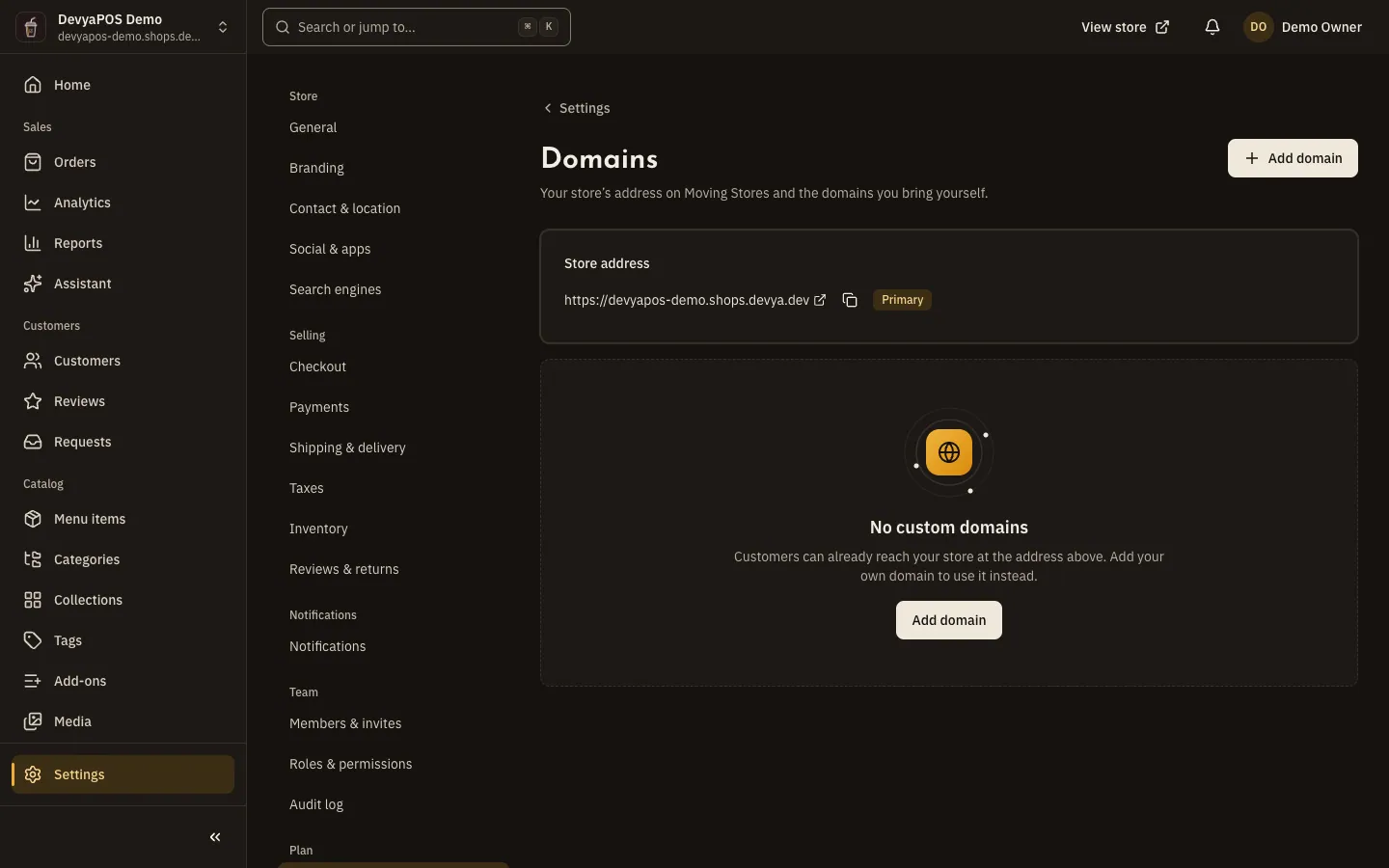
Fig. 1 —The platform address stays at the top, with your domains below it. Step 2: Type the domain
In Add a domain, type the Domain. If you use both
example.comandwww.example.com, add both.Step 3: Add the DNS records
Open DNS records to add, copy each record's Name and Value with Copy the record name and Copy the record value, and add them in your domain's DNS settings.
Step 4: Wait for verification
It usually takes a few minutes, and we keep checking automatically for 72 hours. Click Check now to check straight away.
Step 5: Make it primary
When the status reads Verified, click Make primary and your domain becomes your store's address.
The records you need
| Type | Name | Value | When you need it |
|---|---|---|---|
TXT | _commerce-verify.example.com | The value shown in the dashboard, starting with commerce-verify= | Always. Keep it after verification: it proves the domain is yours. |
CNAME | The subdomain, such as www.example.com | shops.devya.dev | For a subdomain such as www or shop. |
A | The root domain, such as example.com | The IP address shown in the dashboard | For a root domain with no prefix. |
Statuses and failure reasons
| Status | What it means |
|---|---|
| Pending | We haven't found the records yet and keep checking automatically. |
| Verified | The domain points at your store, and the HTTPS certificate is issued automatically on the first visit. |
| Failed | 72 hours passed without verification, or a verified domain failed its check three days in a row. Fix the records and click Try again. |
Each failure comes with its reason: the TXT record wasn't found yet; its value is different, so copy it again; the domain doesn't point at your store, so check the CNAME or A record; or the domain's DNS didn't answer, so try again in a few minutes.
Do I need to buy an SSL certificate?
No. The certificate is issued automatically once the domain is verified.
How do I make the platform address primary again?
Click Stop using as primary on your primary domain.
Why can't I see the Domains section?
It shows the Upgrade required lock when your plan doesn't include custom domains. If it doesn't show at all, your role lacks the View store settings permission.